














link to homepage
lbordertop
menu bar icon

1x1
Designing a folded leaflet
business card printing icon 5

business card printing icon 6

To Home Page
HomePage

01635 255 552

menuclose


11-1
392head
spacer
How to design a folded A4 leaflet
spacer   spacer

How to plan an A4 leaflet/flyer for folding

To Home Page
     

This tutorial is aimed at helping you position your artwork so it can be correctly folded. Dividing an A4 sheet into 3 equal parts will not give you the correct folds, as we need to allow room for the front cover to overlap the other parts.

(1). Turn on rulers in your design package (often Ctrl. R), and set the top left hand corner to: x = 0, y = 0. This will help you to position the margin guides.

(2). Start by setting your workspace to A4 and position your non-printing guides as shown in the diagram below. These guides are where you want the job to be folded.
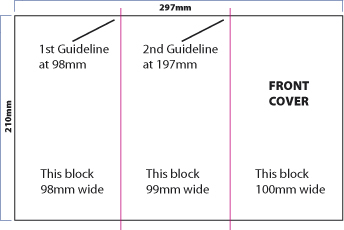
Tip. If you're not familiar with using rulers, then simply create a picture or text box 98mm wide and position the left edge to your workspace. You can then draw a guide down the right hand side of this box. Repeat this process with a box of 99mm width for your 2nd guide. The remaining space should then measure 100mm.

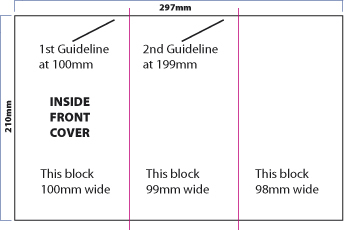
For the inside of the leaflet, it's just a case of reversing the measurements.

The left hand block, which now becomes the inside of the front cover, (see below), will measure 100mm. The centre block will measure 99mm, leaving the final block on the right hand side as 98mm.
leaflet_2

Margins

To get a neat, professional-looking job it's important to use margins. Depending on how much content you have then a good starting point is to use 10mm margins. Use more guides to show the margins, as in below. Start by having a 10mm margin around the whole of the A4 sheet and then position further 10mm margins before and after your guidelines.
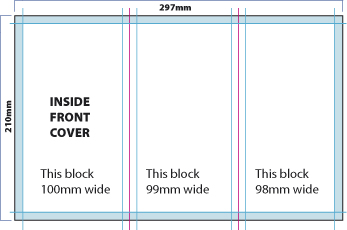
leaflet_3

We now have a 10mm margin around the whole of our A4 sheet, plus the same margin either side of the guidelines.

Don't forget to add your margins to the front of your leaflet.

You are now ready to add content to both sides of your leaflet.
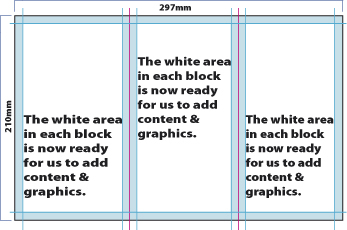
leaflet_4

Many artworkers will position short dotted lines, just above and below the artwork, to mark the position of the folds.

Hope this helps!

However, if any points need clarification or you just need a little assistance please don't hesitate to contact us, and we'll do our best to help.


Return to Home page

Contact
Contact us here with your printing query or for requesting samples
We will deal with your enquiry as soon as possible
You can also call us on: 01635 255 552

back to top

If you've enjoyed reading the above article, or it's been helpful to you I'd really appreciate a link back to it from your blog or website, as every little link helps!
Here are some details to help make the job easier for you . . .
Title = Designing a Folded A4 Leaflet

Description = An easy-to-follow article that explains how to correctly set up your leaflet so it is correctly folded.

URL = www.castleprint.co.uk/designing_a_folded_leaflet.html

Would you like to write for us?

print page

comments powered by Disqus
 

Enquiry Form

rbordertop
footer1
footer3
PRODUCTS SITE INFO ARTICLES OTHER SITE INFO TUTORIALS
Business Cards
Brochures & Flyers
Compliment Slips
Continuous Stationery
Digital Printing Service
Envelope Printing
Folder Printing
Invoices - NCR
Letterheads
Printed Envelopes
Specialist Labels
Trade Printing Service
Xmas Card Printing
Contact Us
Delivery
Terms & Conds.
Privacy
Sitemap
Resources

To Home Page HOME

ARTWORK
Artwork & Design
Artwork Help

Booklet / Self Publishing
Business Card Materials/Boards
Branding and your Image
Colour Problems Discussed
Development of Print Technology
Digital or Litho?
Fonts Explained
Free Business Cards - a bargain right?
History of the Business Card
Legal Requirements for Stationery
Logo Design - where do you begin?
Spot & Process Colours Explained
Using QR Codes on your Stationery
Web Design
Web Design to Print Design
When is Black & White Printing Appropriate?
Copyright - who owns it?
FAQ - Business Cards
FAQ - General Questions
FOR SALE - Used Print Equipment
Glossary of Printing Terms
Job Vacancies
Paper Sizes in the UK
Software for Print & Design
Stock Photo Service
Testimonials
Write for Us
Converting Fonts to Outlines
Design a Business Card
Design a Folded A4 Leaflet
Design a Letterhead
Preparing a Print File in InDesign
Preparing Artwork for Spot UV
Rich Black Colour in Artwork

PHOTOSHOP TUTORIALS

- see full list in main menu on left or follow this link: Photoshop Tutorials
footer4
footer2

"Just to let you know I received the business cards and compliment slips yesterday. Thanks for your help. I'm delighted with the quality. If I can pass some business your way in the future I will."

Kenny King
Ixisys - www.ixisys.com

spacer

Castle Print & Design in partnership with:

  •   The Roman Group
  •   Centurion House
  •   Woodside Road
  •   Southbourne
  •   Bournemouth
  •   Dorset BH5 2BA

  •   Tel: 01635 255 552
  •   Fax: 0800 389 7262

 
laminated business cards icon
 

"I don't normally have the time to shop around too much, but was very happy with your prices and service. The logo you designed for us has been very well received. Look forward to many years of continued business."

Steve Thompson
Horizon Electrical

© Copyright 1992 - 2013 Castle Print & Design - All rights reserved

business card iconbusiness card image 4