
























How To Preserve Spot Colours in Photoshop (vs. 6 and higher)
1. Save the Practice File
How many times have you wondered why, no matter how much you save spot colours in other applications, you cannot preserve a spot color in Photoshop? There is a way of course, and this is what this article will cover.
This tutorial has been made using Photoshop CS for Mac, but it should be OK also for previous versions of Photoshop up to version 6, and of course also for whoever has the Windows version of Photoshop. This is not the only method to use spot colors in Photoshop, but it is a simple one which you could find useful.
To do this tutorial, download the file spottest.zip (right click the link and choose save) then extract it using a program like StuffIt Expander (free download for Mac/Windows).
You will need the included spottest.eps file to follow along with this tutorial.
Let’s say you have done a graphics in Illustrator and for some reason you need to open it in Photoshop to apply certain effects, but you still need to keep your spot colour.
In this image the rectangle and the ellipses are filled with CMYK colours, while the orange star is filled with Pantone Orange. It was originally done with Illustrator and I have now opened it with Photoshop.
2. Open the Channels Palette
The first thing you do, is to open your Channels palette.
Go to Window > Channels.
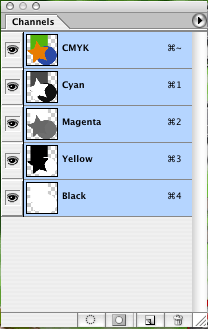
In the Channels palette menu you will see that Yellow is the channel which has the most color for the star. So drag the yellow channel thumbnail onto the New Channel icon at the bottom of your Channels palette. A new channel called Yellow Copy will appear in the Channels palette.
Now, don’t worry if your graphics looks black and white, this is because you are not viewing all of the channels that compose your image, but only the Yellow Copy channel. Just click on the CMYK thumbnail in order to see all of your colors again. Now that you have an additional yellow channel though, your colors will look different, but still don’t worry, we have not finished yet.
3. Set the Channel Options
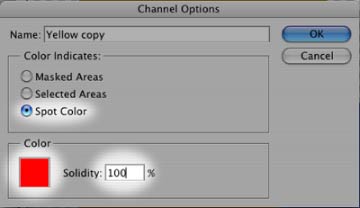
Double click on the Yellow Copy channel. The window Channel Options will show up. Make sure that where it says Color Indicates you choose Spot Color and that you have set the solidity to 100%. Then click onto the red square under the word Color.
When the Color Picker windows shows up, click on Custom. This will open another window called Custom Colors. In the drop down menu Book you can choose which set of colors to use. In this case choose PANTONE solid coated. Choose Pantone Orange 021 C and press OK.
Photoshop will go back to the New Spot Channel window. You will notice that the name of your spot channel has become PANTONE Orange 021 C, whereas before it was simply named with a generic “New Spot Channel.”
Press OK.
The colors of your image might change again. Once again, don’t worry about it, yet. Now go back to your Channels palette. Click on the eye next to the spot channel which you have just created in order to hide it. Click on the CMYK thumbnail on top of the Channels palette so you see all of your colors as they were before. Select the orange star. Make the spot channel visible again and hide the CMYK channels. Your image will be black and white to indicate that you are only working on one channel.
4. Trapping
Go to Select > Inverse to inverse the selection. Make sure you have selected the spot channel and press delete or backspace to clear everything outside the star. You should be left with a black star now.
Go to Select > Inverse again in get back your original selection. Now click on the CMYK thumbnail so that all of the CMYK channels show up again and hide your spot channel. Make sure you still have your star selection active. Press delete or backspace to delete the star. Now make your spot channel visible again. Et voila! Your star is now Pantone Orange 021 C.
You might notice that the there is some very tiny space with no color between the borders of the star and the ones of the other shapes. If that is the case, then it might show up when you print your file. So hide all of your CMYK channels again and make sure that only your spot channel is visible.
Your star will turn black again. You can simply select it with your Magic Wand. Now, go to Select > Modify > Expand.
When the Expand Selection window shows up, type in the number 1 in the Expand by: _ pixels field. Press OK.
Now with your color picker, click on the star.
Choose the Brush Tool.
Make sure it’s a big brush and it’s a solid brush (no feathered edges). With your selection still active, paint around the edges of the star. You are basically painting that extra pixel with the spot color of the star.
Once you are done, make the CMYK channels visible, together with the spot channel. All the colors should touch each other perfectly.
What you have just done is called trapping.
5. Creating Spot Channels in Photoshop
And what if I just want to create a new shape into Photoshop and fill it with a spot color? You can obviously do that as well.
Let’s take our star, square and ellipses again.
Go to the Channels palette menu and choose New Spot Channel.
Here you can choose your spot color the same way you have chosen it before. Use the same settings as I have explained to you earlier.
Let’s say you want to draw a square with your new spot color. You just need to make sure that the only channel that is selected is the one with your spot color, this way whatever painting you do or whatever shapes you make will have the spot color.
Note that when you have selected your spot channel, your foreground and background colors in the Tools palette will only be black, white or shades of gray. That is because you are working only on 1 color, i.e. your spot colors, where black indicates the maximum intensity of your spot color and white indicates the total absence of it. Gray indicates a tint of your spot color.
6. Saving an Image with Spot Colors
Once you have done all this you need to save your image in a suitable file format, which is either TIFF or DCS (Desktop Color Separations).
Once you import the TIFF or DCS file into a layout application also the spot color will be imported.
If you have a layout application that supports PSD files, such as InDesign, then you can also save your file into a PSD.
There is much more to learn, but it would require a lot of time to explain everything.
With this article you have got the basics of how to work with spot colors in Photoshop.


Leave a Reply