















| |
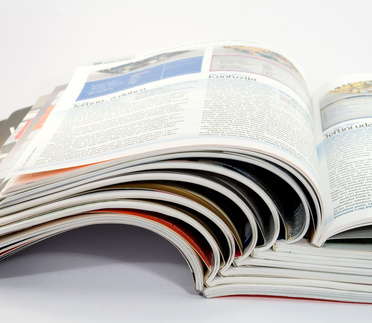
We offer a complete high-quality booklet-printing service where artwork can be supplied by yourself or designed and printed by ourselves in-house.
There are many finishing options available:
perfect binding, wiro-binding, stitching etc.
Rather than subject you to a multi-question form to fill in, it's much easier to call us on: 01635 255 552 and speak to Debbie, who will be able to ask you the right questions regarding your booklet project.
This way, an accurate quotation can be quickly calculated and emailed, or phoned back to you. |
|
|
| |
Booklet Artwork
If you're considering designing your own booklet then it's worth checking to see whether the format you will be supplying the booklet in is usable.
Probably the easiest way, if this is your first booklet, is to design each page in order. For instance, if you're using Word as an example then just start by designing the front cover on page 1, back cover on page 2, the first inner page on page 3 etc. etc. until you reach the end of the booklet. We can then make a pdf of your file and, using imposition software, can 'arrange' the pages into the correct order.
If you prefer to 'impose' the job yourself, then that's fine also. Imposition is just the term used to describe the arrangement of pages. Page 1 with Page 20 - Page 19 with Page 2 etc. as an example.
Let's say your booklet is going to be around the 20 page mark plus a cover.
Grab some sheets of blank paper, and start to make up a dummy booklet.

The back cover will fold in behind the front cover.
If the cover was going to be printed on the inside, then we'd have these 2 pages.
Page 1 needs to start on the right-hand page. (Odd numbers on the right, even numbers on the left).
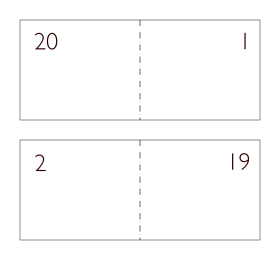
Remember, page 20 will fold in behind page 1.
As you can see from the above, Page 2 - 19 will be printed on the reverse of Page 1 - 20.
So, Page 2 will immediately go behind Page 1.
And so on . . .
Carry on putting your dummy booklet together until you end up with the complete set of pages.
If you are using a professional layout program such as Adobe
In-Design© or QuarkXpress© then an easy way to identify your pages, whilst putting together the booklet, is to put the page numbers to the left and right hand sides of the workspace, (so it doesn't get printed), in large lettering. That way you can easily see the complete picture.
Publishing your book / booklet
A common scenario is this. You have a book, or booklet that you need to get published and have spent hundreds of hours putting together all the text and images, many of which may need scanning-in by your print shop.
You approach your local printer, only to be told that due to economies of scale a minimum cost-effective run would be 500 / 1000 copies. When estimating all the artwork / layout involved it transpires that the job is going to be very costly.
OK, you may have total faith in your project and believe it may sell well, but because of the costs involved you'd prefer to somehow test the water.
At this stage, depression starts to creep in and you wished you'd done all the costing exercises before getting to this stage.
Well, all is not lost. This is where self-publishing can help.
What is self-publishing?
Well, if you've ever tried to publish a book you will already know the massive amount of work that can be involved - copyrights, ISBN catalogue procedure, barcoding, advertising etc. are just some of the aspects you need to address.
There is now a solution to this common problem. There are companies that handle all aspects of firstly, getting your project into print and then taking care of all the nitty-gritty that follows this stage, right up to helping with advertising etc. The main point of consideration however is - if you only need 1, 5, or 10 copies of your book, or whatever amount you decide, then that is perfectly acceptable. Copyright is 100% yours - no need to sign away part of the ownership with a publisher.
There are many, many benefits publishing your book in this way. It could mean the difference in having a pile of unsold books in your garage collecting dust, or having your books produced singly on-demand whenever you need them with enough profit margin to make the excercise really worthwhile.
The costs involved are extremely favourable and work out much cheaper than conventional lithographic methods where you need to bulk-buy to get the best deal.
Another plus point is the fact that should you wish to change something in your book, then you don't have to scrap a whole bunch of pre-printed ones, as this is all factored in with on-demand printing.
If there's something that needs explaining in the above article, or you have tips / shortcuts of your own, please leave a message in the comments section below.
If on-demand publishing is not what you need and you wish to receive a quotation for your litho-printed booklet then please contact Debbie on: 01635 255 552
 |
Contact us here with your printing query or for requesting samples
We will deal with your enquiry as soon as possible
You can also call us on: 01635 255 552 |
|

Do you have a website or blog? Please support this page.
If you've enjoyed reading the above article, or it's been helpful to you we'd really appreciate a link back to it from your blog or website, as every little link helps! |
Here are the relevant details to help make the job easier for you . . . |
Title = Booklet Printing & Self Publishing
Description = An easy-to-follow tutorial on planning the pages of a booklet with some extra information on self publishing.
URL = http://www.castleprint.co.uk/booklet_printing_booklet_publishing.html |
|
Designers! Would you like to write for us?
Are you a designer? If so, would you like to contribute to our site in return for some promotional links back to your site / blog?
Whether it's a tutorial using your favoured software, logo design, web design or you have some useful general design tips, then we'd love to hear from you. Providing your content is unique, i.e. not published elsewhere, then I'm sure we can come to an arrangement whereby we both benefit.
If so, please drop us a line here:- Write For Us Enquiry Form
|
Please help us to provide you the reader with the most relevant content by providing your feedback on the above article/tutorial.
We don't ask for any personal information and it will take less than a minute to leave feedback. Please submit your feedback here:


back to top |
|